Data security is no longer optional—it’s essential for business longevity. Yet, one of the most significant vulnerabilities remains unchanged: passwords. With 182 different accounts to manage, many users default to convenience over security, reusing the same password across multiple platforms. This common practice leaves businesses exposed to cyber threats.
In 2022, tech giant AMD suffered a devastating data breach when a ransomware group exploited poor password security, exposing sensitive research and financial data. This is not an isolated event. Cyberattacks are increasing in both frequency and sophistication, with small businesses becoming primary targets. According to Verizon’s security report, 81% of data breaches are caused by weak or compromised passwords.
A proactive approach is critical. Implementing password management software for small businesses is one of the most effective cybersecurity investments. The right solution not only secures credentials but also integrates phishing protection and network controls—three key components of a strong security infrastructure.
Password Security
Passwords are automatically generated when using password management software. The generated passwords are unique and complex containing a random string of letters, numbers, and symbols. As demonstrated by Figure 1, most internet users reuse their passwords across multiple websites and do not make unique passwords for each site they visit.
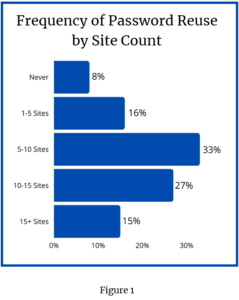
The reuse of passwords across multiple websites is a serious security problem. By reusing passwords, a compromised password on one website may lead to compromised passwords on other websites.
Password management software allows users to store their passwords in a central location. The central location is not only convenient when working across multiple devices, but also more secure. By storing all passwords in a single location, a user only needs to focus their security efforts on the password management software. As long as a user’s login credentials for their password manager are secure, then all information stored inside will remain secure.
To further fortify protection, many password managers integrate multi-factor authentication (MFA), allowing users to store MFA codes alongside their credentials. This additional layer of security minimizes unauthorized access—even if a password is compromised, cybercriminals cannot breach the system without the secondary authentication factor.
Phishing Protection
Phishing remains one of the most pervasive threats to businesses today. In 2021 alone, 83% of organizations reported experiencing phishing attacks—a staggering statistic highlighting the urgent need for better security measures.
How does a password manager mitigate phishing risks? By verifying website domains before autofilling credentials, password managers prevent users from unknowingly entering login details on fraudulent sites. Even if an employee clicks on a phishing email, their password manager won’t autofill credentials unless the website is legitimate.
This built-in safeguard acts as a critical last line of defense, preventing human error from compromising sensitive data. Employees are alerted to suspicious activity, giving them a chance to recognize and report potential phishing attempts before damage occurs.
Network Control: Visibility and Security for IT Teams
For businesses managing remote teams or multiple locations, IT support solutions for remote workforce management are essential. Password managers provide visibility into access patterns, enabling IT administrators to monitor, restrict, and control credentials based on user roles and security protocols.
Advanced features like IP locking ensure that passwords can only be accessed from approved networks, reducing exposure to unsecured Wi-Fi and potential cyber threats. Additionally, security reports offer insights into password hygiene, helping IT teams pinpoint vulnerabilities, enforce best practices, and proactively strengthen defenses.
A Smarter, Scalable Approach to Security
For small businesses, adopting managed IT services for cybersecurity compliance is no longer just a precaution—it’s a necessity. Password management software not only safeguards sensitive information but also streamlines security protocols, making protection effortless rather than cumbersome.
By integrating a password manager with robust network controls, phishing protection, and MFA support, businesses can:
✔ Enhance security with complex, unique passwords for every account
✔ Mitigate phishing attacks with automatic domain verification
✔ Improve operational efficiency with secure password storage across remote teams
✔ Gain visibility into access patterns and enforce stronger security policies
Investing in the best password management software is one of the most effective ways to protect your business from cyber threats. The question isn’t whether your company should adopt a password manager—it’s whether you can afford not to.
Take control of your security today. Evaluate your organization’s password policies, explore top-rated password management solutions, and ensure your business is safeguarded for the future.